Account
Both Direct Inference and Fine-tuning use the same per-provider account system: you deposit to a main account, transfer funds to each provider's sub-account, and the provider deducts from there as you use the service. This page is the shared reference for all operations — Web UI, CLI, and SDK.
The Router has its own unified billing and does not use per-provider sub-accounts. Router deposits, balance, API keys, and usage live elsewhere — see Router → Deposits & Billing and Router → Authentication.
Overview
The account system provides a secure and flexible way to manage funds across different AI service providers.
Account Structure
- Main Account: Your primary wallet where funds are deposited. All deposits go here first, and you can withdraw funds from here back to your wallet.
- Sub-Accounts: Provider-specific accounts created automatically when you transfer funds to a provider. Each provider has a separate sub-account where funds are locked for their specific services.
Fund Flow
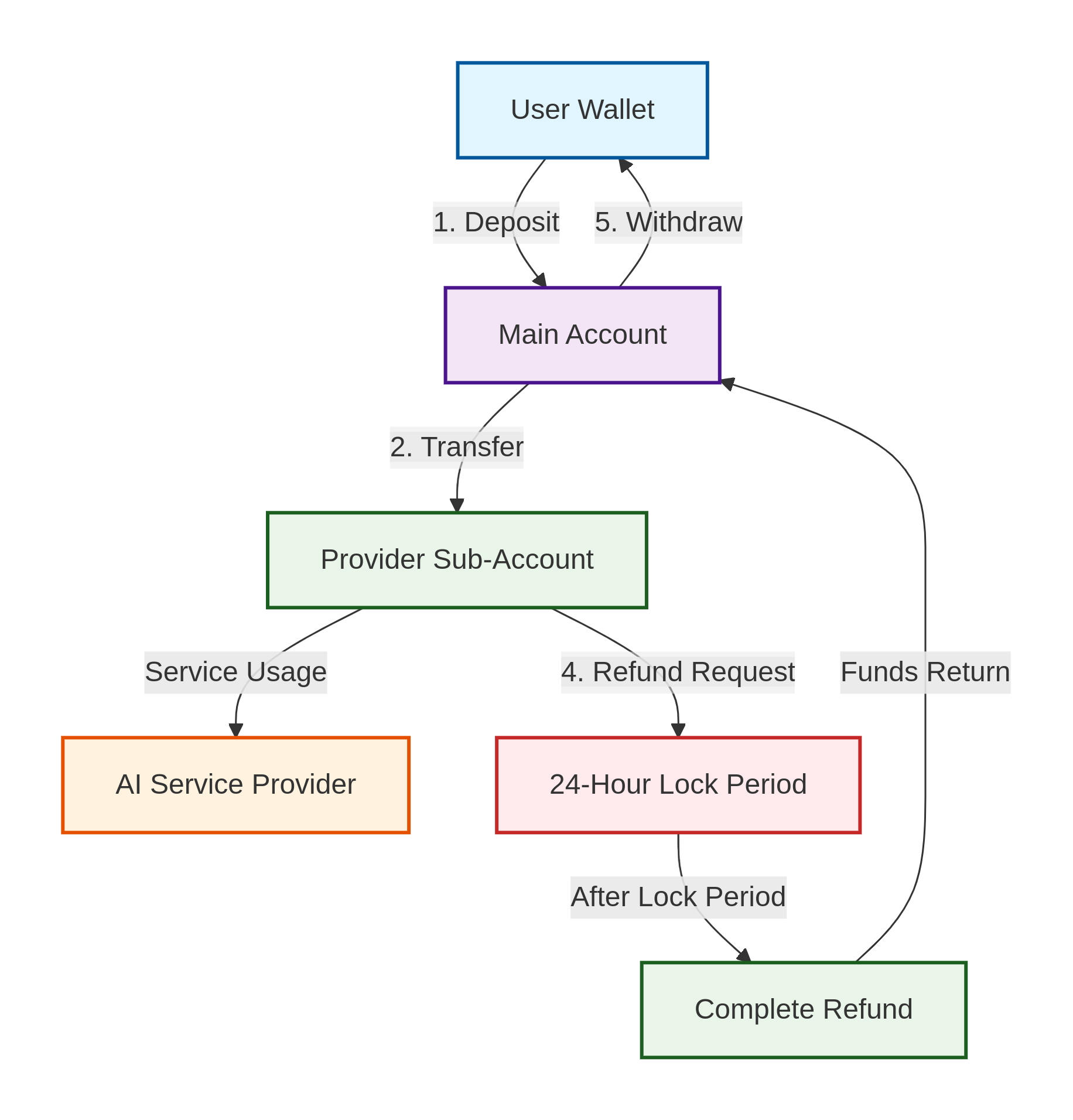
- Deposit: Transfer funds from your wallet to your Main Account
- Transfer: Move funds from Main Account to Provider Sub-Accounts
- Usage: Provider deducts from Sub-Account for services rendered
- Refund Request: Initiate refund from Sub-Account (enters 24-hour lock period)
- Complete Refund: After lock period expires, call retrieve-fund again to complete transfer back to Main Account
- Withdraw: Transfer funds from Main Account back to your wallet
Security Features
- 24-hour lock period for refunds to protect providers from abuse
- Single-use authentication for each request to prevent replay attacks
- On-chain verification for all transactions ensuring transparency
- Provider acknowledgment required before first use of services
Prerequisites
- Node.js >= 20.0.0
- A wallet with 0G tokens (for testnet or mainnet)
- EVM compatible wallet (for Web UI)
Choose Your Interface
| Feature | Web UI | CLI | SDK |
|---|---|---|---|
| Setup time | ~1 min | ~2 min | ~5 min |
| Visual dashboard | ✅ | ❌ | ❌ |
| Automation | ❌ | ✅ | ✅ |
| App integration | ❌ | ❌ | ✅ |
- Web UI
- CLI
- SDK
Best for: Quick account management with visual dashboard
Installation
pnpm add @0gfoundation/0g-compute-ts-sdk -g
Launch Web UI
0g-compute-cli ui start-web
Access the Web UI at http://localhost:3090/wallet where you can:
- View your account balance in real-time
- Deposit funds directly from your connected wallet
- Transfer funds to provider sub-accounts
- Monitor spending and usage
- Request refunds with a visual interface
Best for: Automation, scripting, and server environments
Installation
pnpm add @0gfoundation/0g-compute-ts-sdk -g
Setup Environment
Choose Network
0g-compute-cli setup-network
Login with Wallet
Enter your wallet private key when prompted. This will be used for account management and service payments.
0g-compute-cli login
CLI Commands
Deposit Funds
Add funds to your main account:
0g-compute-cli deposit --amount 10
Check Balance
View your account overview:
0g-compute-cli get-account
Example output:
Overview
┌──────────────────────────────────────────────────┬─────────────────────────────────────────────────────┐
│ Balance                                          │ Value (0G)                                          │
├──────────────────────────────────────────────────┼─────────────────────────────────────────────────────┤
│ Total                                            │ 8.822778129999999663                                │
├──────────────────────────────────────────────────┼─────────────────────────────────────────────────────┤
│ Locked (transferred to sub-accounts)             │ 8.257334240000000491                                │
├──────────────────────────────────────────────────┼─────────────────────────────────────────────────────┤
│ Available for transfer to sub-accounts           │ 0.265443889999999960                                │
└──────────────────────────────────────────────────┴─────────────────────────────────────────────────────┘


Inference sub-accounts
┌────────────────────────┬──────────────────────────────┬────────────────────────────────────────────────┐
│ Provider               │ Balance (0G)                 │ Requested Return to Main Account (0G)          │
├────────────────────────┼──────────────────────────────┼────────────────────────────────────────────────┤
│ 0x924A2c71...          │ 3.257334240000000047         │ 0.000000000000000000                           │
├────────────────────────┼──────────────────────────────┼────────────────────────────────────────────────┤
│ 0x960E74Fc...          │ 3.000000000000000000         │ 3.000000000000000000                           │
├────────────────────────┼──────────────────────────────┼────────────────────────────────────────────────┤
│ 0x4f371f6e...          │ 3.299999999999999822         │ 0.000000000000000000                           │
└────────────────────────┴──────────────────────────────┴────────────────────────────────────────────────┘
Transfer to Provider
Before using a provider's service, transfer funds to their sub-account:
0g-compute-cli transfer-fund --provider <PROVIDER_ADDRESS> --amount 5
Request Refund
Withdraw unused funds from sub-accounts back to main account:
0g-compute-cli retrieve-fund
Note: Refunds have a 24-hour lock period for security. After the lock period expires, you need to call this function again to complete the refund and transfer the funds back to your main account. You can check the remaining lock time using the get-sub-account command:
0g-compute-cli get-sub-account --provider <PROVIDER_ADDRESS>
Example output showing refund details:
Details of Each Amount Applied for Return to Main Account
┌──────────────────────────────────────────────────┬──────────────────────────────────────────────────┐
│ Amount (0G)                                      │ Remaining Locked Time                            │
├──────────────────────────────────────────────────┼──────────────────────────────────────────────────┤
│ 0.099785050000000000                             │ 23h 43min 15s                                    │
└──────────────────────────────────────────────────┴──────────────────────────────────────────────────┘
Withdraw to Wallet
Withdraw funds from main account to your wallet:
0g-compute-cli refund --amount 5
Best for: Application integration and programmatic access
Installation
pnpm add @0gfoundation/0g-compute-ts-sdk
Initialize Broker
import { ethers } from "ethers";
import { createZGComputeNetworkBroker } from "@0gfoundation/0g-compute-ts-sdk";

const provider = new ethers.JsonRpcProvider("https://evmrpc-testnet.0g.ai");
const wallet = new ethers.Wallet(process.env.PRIVATE_KEY!, provider);
const broker = await createZGComputeNetworkBroker(wallet);
Check Account Balance
const account = await broker.ledger.getLedger();
console.log(`Total Balance: ${ethers.formatEther(account.totalBalance)} 0G`);
console.log(`Available: ${ethers.formatEther(account.availableBalance)} 0G`);
Deposit Funds
await broker.ledger.depositFund(10); // Deposit 10 0G
Transfer to Provider
const providerAddress = "<PROVIDER_ADDRESS>";
const amount = ethers.parseEther("5"); // 5 0G
await broker.ledger.transferFund(providerAddress, "inference", amount);
Check Sub-Account Details
const [subAccount, refunds] = await broker.inference.getAccountWithDetail(providerAddress);
console.log(`Sub-account balance: ${ethers.formatEther(subAccount.balance)} 0G`);

const { account: subAccount, refunds } = await broker.fineTuning.getAccountWithDetail(providerAddress);
console.log(`Sub-account balance: ${ethers.formatEther(subAccount.balance)} 0G`);
Request Refund
await broker.ledger.retrieveFund("inference");
await broker.ledger.retrieveFund("fine-tuning");
Withdraw to Wallet
await broker.ledger.refund(5); // Withdraw 5 0G
Best Practices
For Inference Services
- Deposit enough funds for expected usage
- Transfer funds to providers you plan to use frequently
- Keep some balance in sub-accounts for better response times
- Monitor usage regularly
For Fine-tuning Services
- Calculate dataset size before transferring funds
- Transfer enough to cover the entire training job
- Request refunds for unused funds after job completion
Troubleshooting
Insufficient Balance Error
Check which account needs funds:
- Main account: Use
deposit - Sub-account: Use
transfer-fund
# Check all balances
0g-compute-cli get-account

# Deposit to main account if needed
0g-compute-cli deposit --amount 10

# Transfer to provider if needed
0g-compute-cli transfer-fund --provider <ADDRESS> --amount 5
Refund Not Available
Refunds have a 24-hour lock period. After the lock period expires, you need to call the retrieve-fund function again to complete the refund. Check the status:
0g-compute-cli get-sub-account --provider <PROVIDER_ADDRESS>
Look for "Remaining Locked Time" in the output.
Transaction Failed
Common causes:
- Network issues - Check your RPC endpoint
- Gas price too low - Increase gas price
- Insufficient gas - Ensure wallet has enough for gas fees
# Specify custom gas price
0g-compute-cli deposit --amount 10 --gas-price 20000000000
Related Documentation
- Inference Services - Using AI inference with your funded accounts
- Fine-tuning Services - Training custom models with your funded accounts